

Developer tools
Webhooks
A signed POST to your own URL the moment a capture finishes, so your systems find out without asking us every minute.
What a webhook is here
You register a URL; we POST a small JSON body to it when something happens to one of your captures. One set of endpoints covers both products — Auto Schedules and the Instant Snap API — and every delivery is signed with a secret only you and we know.
- We never send the file. The body carries ids and status, not bytes and not a download link. Fetch the capture through the API with your own key when you want it — a link in a webhook body would outlive the delivery and leak if the log were ever shared.
- Answer fast. We wait ten seconds for a 2xx. Acknowledge first and do your work afterwards.
- Expect duplicates. A delivery we are unsure about is retried, so the same
idcan arrive twice. Treat it as the de-duplication key.
Setting one up
- 1
Add an endpoint
Developer Tools → Webhooks → Add endpoint. Give it a name, the Endpoint URL, and tick the events it should receive. You can limit it to one product (Auto Schedules only, Instant Snap only, or Both products), or to a single schedule. - 2
Copy the signing secret
Reveal it on the same page and store it wherever your endpoint reads its configuration. One secret covers every endpoint in the workspace. - 3
Switch webhooks on in the Web Profile
For Auto Schedules, every event is sent only for schedules whose Web Profile has Trigger webhook switched on, under After the capture. An endpoint alone is not enough. - 4
Send a test
The Send test button posts a ping immediately and shows the status code your endpoint answered with. It appears in the delivery log like any other delivery.
Public https addresses only
Included in every paid plan
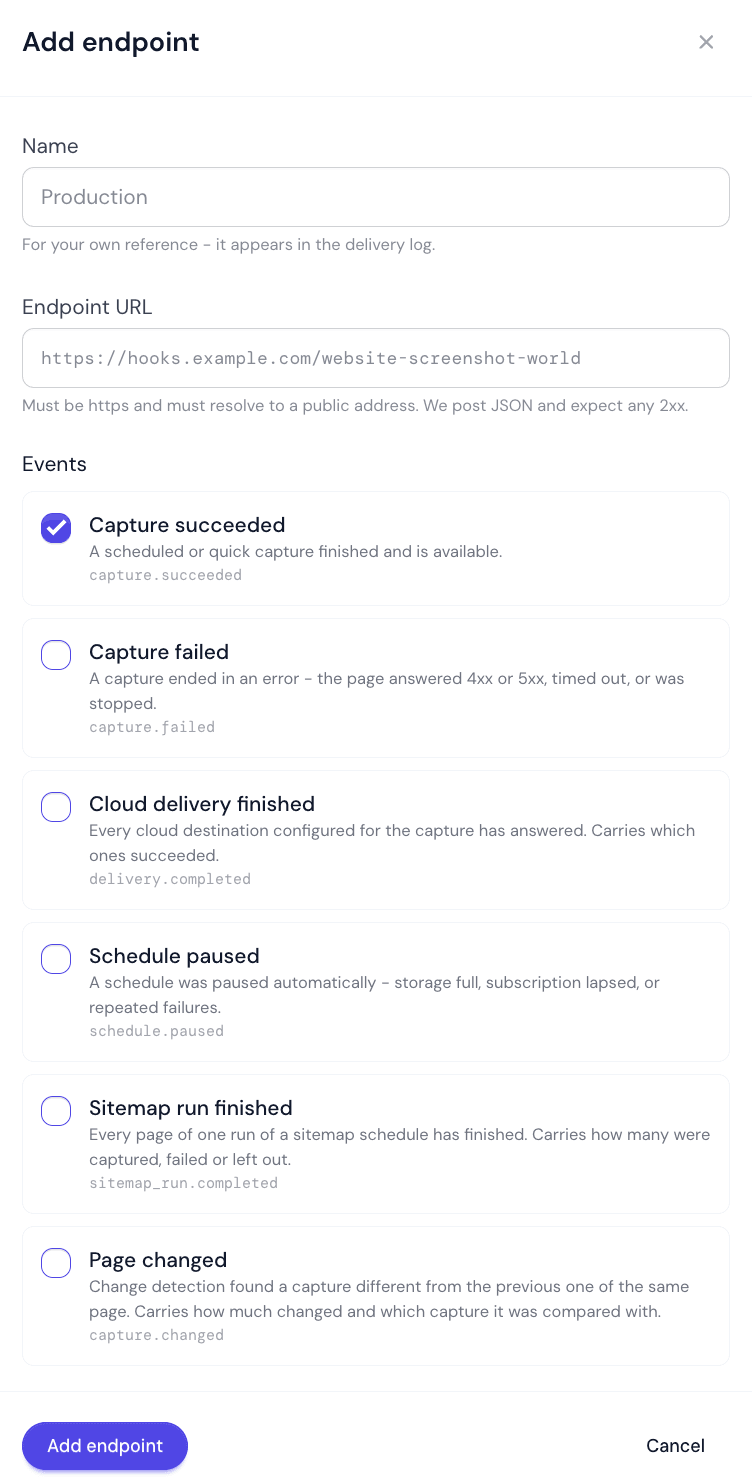
The events
The endpoint form lists each event by the name in brackets below; Test ping is not in the form and appears only in the delivery log. The wire name is what arrives in type and in the X-WSW-Event header.
| Value | Meaning |
|---|---|
capture.succeeded | (Capture succeeded) A capture finished and can be fetched. For Auto Schedules this is the moment the capture becomes viewable; for Instant Snap it is the terminal success. |
capture.failed | (Capture failed) A capture ended without a usable result — the page answered 4xx or 5xx, it timed out, or it was stopped. An Instant Snap capture that was refused before it ran, with the refusal in the API's own response (capture_busy, service_unavailable, or queue_full for an async capture), sends none: the response is the answer, and you retry it. A queued async capture that expired (capture_expired) is announced, because that is how you learn of it. |
capture.changed | (Page changed) Auto Schedules only. Change detection found a capture different from the previous capture of the same page. Sent right after that capture's capture.succeeded. |
delivery.completed | (Cloud delivery finished) A capture's upload to your storage has finished, successfully or not, so it fires either way. Auto Schedules: every cloud destination configured for the capture has answered, and the payload says which succeeded and which failed; a capture with no destinations never produces it. Instant Snap: the upload of a cloud_storage capture to your bucket has finished or finally failed, after that capture's capture.succeeded; the payload is the capture with s3_delivery as it now stands. |
sitemap_run.completed | (Sitemap run finished) Auto Schedules only. Every page of one run of a sitemap schedule has finished. Each page was already announced as its own capture; this carries the counts for the run as a whole. |
schedule.paused | (Schedule paused) Auto Schedules only. We paused a schedule ourselves — storage full, or a lapsed subscription. A schedule you paused yourself is not announced. |
ping | (Test ping) Only from the Send test button, and it is delivered whether or not the endpoint subscribes to anything. It carries no capture data. |
The request we send
POST /your-endpoint HTTP/1.1
Content-Type: application/json
User-Agent: WebsiteScreenshotWorld-Webhooks/1
X-WSW-Event: capture.succeeded
X-WSW-Delivery: 0b2e6f5a-8c31-4b2f-9a6d-9f5a1e2b7c44
X-WSW-Attempt: 1
X-WSW-Signature: t=1767225600,v1=c03a0b18...58ef9

{
  "id": "0b2e6f5a-8c31-4b2f-9a6d-9f5a1e2b7c44",
  "type": "capture.succeeded",
  "created_at": "2026-09-07T09:00:31.664Z",
  "product": "auto_schedule",
  "data": {
    "id": "3f2a1b0c-9d8e-4756-8493-a2b1c0d9e8f7",
    "schedule_id": "5c4b3a29-1807-4f6e-95d4-c3b2a1908f7e",
    "schedule_name": "Homepage watch",
    "url": "https://example.com/",
    "status": "succeeded",
    "media_category": "image",
    "format": "png",
    "page_http_status": 200,
    "captured_at": "2026-09-07T09:00:00.000Z",
    "final_url": null,
    "media_sha256": "9f86d081884c7d659a2feaa0c55ad015a3bf4f1b2b0b822cd15d6c15b0f00a08",
    "page_source": null,
    "sitemap_run_id": null
  }
}| Field | Type | Default | Description |
|---|---|---|---|
id | string (uuid) | — | The delivery id, repeated in X-WSW-Delivery. Two POSTs with the same id are one delivery retried — de-duplicate on it. |
type | string | — | The event name, as in the table above. |
created_at | string (ISO 8601, UTC) | — | When this attempt was made, so a retry carries a later value. |
product | string | — | auto_schedule or instant_snap. |
data | object | — | The event's own fields, listed below. Every field is always present; a value that does not apply is null rather than missing. Timestamps are ISO 8601 in UTC with milliseconds. |
Capture fields
capture.succeeded and capture.failed from an Auto Schedule carry these fields in data. capture.changed and delivery.completed start with the same fields and add their own.
| Field | Type | Default | Description |
|---|---|---|---|
id | string (uuid) | — | The capture. |
schedule_id | string (uuid) | — | The schedule that took it — the id the Auto Schedule API's trigger-now takes. |
schedule_name | string | — | The schedule's description, or its domain when it has none. |
url | string | — | The page that was captured. |
status | string | — | succeeded, http_status_error, failed, missed, cancelled, stopped, media_delivered or delivery_failed. |
media_category | string | — | image, video, pdf or content. |
format | string | — | The file format, for example png or mp4. |
page_http_status | integer | — | The status the page itself answered with. A capture of a 404 page is still a capture. |
captured_at | string (ISO 8601) | — | When the page was captured. |
final_url | string | — | Where the browser ended up, when that differs from url. Null means no redirect. |
media_sha256 | string | — | The SHA-256 of the stored file. |
page_source | object | — | format (html, json, text or markdown) and sha256 of the saved page source, or null when none was saved. |
sitemap_run_id | string (uuid) | — | The sitemap run this capture is one page of. Null for every other schedule. |
An Instant Snap capture is sent exactly as a read of it through the API returns it, without the download links.
capture.changed
Every capture field above, and then three more. The picture of what changed is never linked from the webhook; open the capture in the app to see it.
| Field | Type | Default | Description |
|---|---|---|---|
change_percent | number | — | How much of the page changed, from 0 to 100, for example 12.4. It is enough to count as a change at the profile's sensitivity, or there would be no event. |
compared_to_capture_id | string (uuid) | — | The earlier capture of the same page it was compared with. |
change_image_available | boolean | — | Whether a picture of the change was stored with the capture. |
POST /your-endpoint HTTP/1.1
Content-Type: application/json
X-WSW-Event: capture.changed

{
  "id": "7d1c0a4e-2b9f-4e61-8c3a-5f0e9d2b1a77",
  "type": "capture.changed",
  "created_at": "2026-09-27T09:00:34.118Z",
  "product": "auto_schedule",
  "data": {
    "id": "3f2a1b0c-9d8e-4756-8493-a2b1c0d9e8f7",
    "schedule_id": "5c4b3a29-1807-4f6e-95d4-c3b2a1908f7e",
    "schedule_name": "Competitor pricing",
    "url": "https://example.com/pricing",
    "status": "succeeded",
    "media_category": "image",
    "format": "png",
    "page_http_status": 200,
    "captured_at": "2026-09-27T09:00:00.000Z",
    "final_url": null,
    "media_sha256": "9f86d081884c7d659a2feaa0c55ad015a3bf4f1b2b0b822cd15d6c15b0f00a08",
    "page_source": null,
    "sitemap_run_id": null,
    "change_percent": 12.4,
    "compared_to_capture_id": "a81b2c3d-4e5f-4a6b-9c7d-8e9f0a1b2c3d",
    "change_image_available": true
  }
}
sitemap_run.completed
Sent once per run, when every page queued in it has finished — or 12 hours after its last page was due, with any page still unfinished counted as failed. A run that queued nothing is announced at once, with status failed and the reason in message — the sitemap could not be read, no page matched, the previous run was still capturing, the plan did not allow it, or there was no active subscription. The reason is also shown in the schedule’s Sitemap runs panel. A missed run, one whose time passed unrun, sends no event.
| Field | Type | Default | Description |
|---|---|---|---|
sitemap_run_id | string (uuid) | — | The run. Every page capture of it carries the same value in its own sitemap_run_id. |
schedule_id | string (uuid) | — | The sitemap schedule. |
schedule_name | string | — | The schedule's description, or its domain when it has none. |
sitemap_url | string | — | The sitemap read for this run, as it was at the time. |
status | string | — | completed, failed, or stopped - the site was failing, so the run stopped early and the message says how many pages failed. |
run_at | string (ISO 8601) | — | When the run was due. |
completed_at | string (ISO 8601) | — | When the run was closed. |
pages_listed | integer | — | Every page the sitemap listed. |
pages_matched | integer | — | Pages on the sitemap's own site that passed your include and exclude patterns. |
pages_queued | integer | — | Pages queued for capture: the matched pages less those over the page limit and the quota. |
pages_succeeded | integer | — | Queued pages that produced a capture. |
pages_failed | integer | — | Queued pages that did not. |
pages_stopped | integer | — | Queued pages a run that stopped early never tried. They are not charged. |
pages_over_limit | integer | — | Matching pages left out because they were past the schedule's pages per run. They take their turn in later runs, least recently captured first. |
pages_over_quota | integer | — | Matching pages within the limit that your remaining quota no longer covered. |
message | string | — | What a person needs to know about the run — for example child sitemaps that could not be read, or pages that were left out. For a failed run, why it queued nothing. Null when there is nothing to add. |
POST /your-endpoint HTTP/1.1
Content-Type: application/json
X-WSW-Event: sitemap_run.completed

{
  "id": "c2e8f1a0-6b4d-4f3e-9a2c-1d0b8e7f6a55",
  "type": "sitemap_run.completed",
  "created_at": "2026-09-27T09:25:02.431Z",
  "product": "auto_schedule",
  "data": {
    "sitemap_run_id": "e4d3c2b1-a098-4f76-8e5d-4c3b2a190817",
    "schedule_id": "6a5b4c3d-2e1f-4a0b-9c8d-7e6f5a4b3c2d",
    "schedule_name": "Blog archive",
    "sitemap_url": "https://example.com/sitemap.xml",
    "status": "completed",
    "run_at": "2026-09-27T09:00:00.000Z",
    "completed_at": "2026-09-27T09:25:01.907Z",
    "pages_listed": 180,
    "pages_matched": 120,
    "pages_queued": 100,
    "pages_succeeded": 98,
    "pages_failed": 2,
    "pages_stopped": 0,
    "pages_over_limit": 20,
    "pages_over_quota": 0,
    "message": null
  }
}
Other payloads
| Field | Type | Default | Description |
|---|---|---|---|
delivery.completed | capture fields + destinations | — | From an Auto Schedule: destinations is an array with one object per configured destination: slot (1 to 3), name, provider (google_drive, dropbox or aws_s3), status (succeeded, failed, in_progress, not_started or none) and completed_at. From Instant Snap: the capture as the API returns it; s3_delivery.status is completed or failed, and s3_delivery.error says why a failed upload failed. |
schedule.paused | object | — | schedule_id, schedule_name, url, reason (StorageFull, SubscriptionLapsed, or CapturesRefused when the website refused three runs in a row) and paused_at. |
ping | object | — | endpoint_id, endpoint_name, message and sent_at. |
Verifying the signature
Every delivery carries X-WSW-Signature in the form t=<unix seconds>,v1=<hex>. The signed text is the timestamp, a full stop, and the raw request body:
secret = whsec_testsecret
t      = 1767225600
body   = {"id":"a","type":"ping"}
signed = 1767225600.{"id":"a","type":"ping"}
v1 = c03a0b1898f8ab18939c00d5afc47d131bbd24ac9d4db23038412cfc26d58ef9// Node.js, Express. Note express.raw: the signature is over the bytes we sent,
// so the body must not be parsed before it is checked.
import crypto from "node:crypto";
app.post("/your-endpoint", express.raw({ type: "application/json" }), (req, res) => {
const header = req.get("X-WSW-Signature") ?? "";
const parts = Object.fromEntries(header.split(",").map((p) => p.split("=")));
const timestamp = Number(parts.t);
// A captured delivery is useless after a few minutes only if you check this.
if (!Number.isFinite(timestamp) || Math.abs(Date.now() / 1000 - timestamp) > 300) {
return res.status(400).send("stale");
}
const expected = crypto
.createHmac("sha256", process.env.WSW_WEBHOOK_SECRET)
.update(`${parts.t}.${req.body.toString("utf8")}`)
.digest("hex");
const ok =
parts.v1?.length === expected.length &&
crypto.timingSafeEqual(Buffer.from(parts.v1), Buffer.from(expected));
if (!ok) return res.status(401).send("bad signature");
// Answer first, work afterwards: we give up after 10 seconds and retry.
res.status(200).end();
enqueue(JSON.parse(req.body.toString("utf8")));
});Sign the bytes, not the object
Rotating the secret takes effect immediately and invalidates nothing already sent. Accept both the old and the new secret for a few minutes while your deployment catches up.
Retries and failure
- Any 2xx is success. A redirect is not followed and counts as a failure.
- Each delivery gets six attempts in all — immediately, then after about 1 minute, 5 minutes, 30 minutes, 2 hours and 6 hours. After the sixth it is marked Failed.
- After twenty consecutive failed deliveries the endpoint is switched off and we email you. Switching it back on clears the count.
- A delivery marked dropped was never sent, because the address is one we will not post to. Fix the URL rather than retrying it.
The delivery log on the Webhooks page shows every attempt for the last 30 days, with the status code and the time your endpoint took. A failed delivery can be sent again from there with Send again.
Instant Snap callback_url
A capture request to the Instant Snap API can carry its own callback_url. It is delivered exactly like an endpoint delivery — same envelope, same headers, signed with the same workspace secret — and appears in the same log, with no endpoint name against it. It is delivered in addition to any endpoints subscribed to Instant Snap events, so a request that sets one while an endpoint also matches produces two deliveries of the same event.
Did this page answer your question?
Tell us what is missing