

Storage and delivery
Google Drive delivery
The least effort of the three destinations: sign in, grant access, done. No keys to copy and nothing to store.
Connecting
- 1
Open Cloud Storage
Auto SchedulesConfigureCloud Storage, then Add destination.
- 2
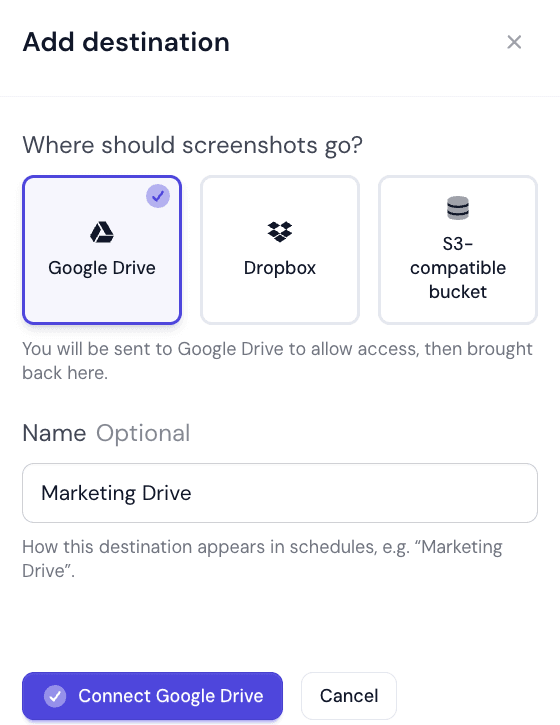
Choose Google Drive and name it
Pick Google Drive under Where should screenshots go? and give it a name that says where the files land. The name is optional; left empty it is called Google Drive.
- 3
Press Connect account
You are sent to Google to sign in and allow access, then brought back. On success the app confirms Google Drive connected. If access was declined you see Google did not authorise the connection., and if something else went wrong, Google Drive could not be connected. Please try again.
- 4
Check the connection
Under Connected accounts the Connection column should read Connected. Test connection in the row’s menu checks it again at any time.
Using it
A new account is placed in the first free default slot when your plan has one. Every Web Profile whose Deliver to is My defaults then uploads to it; or choose it on a single profile with Choose…. From the next capture onwards the files arrive in a WebsiteScreenshotWorld folder in Google Drive.
Pause uploads in the row’s menu is the quick off switch — it stops delivery without losing the connection or the settings on any profile pointing at it.
Re-connecting
Google access can lapse: the password changes, the grant is revoked in the Google account’s security settings, or an administrator withdraws third-party access. The Connection column then reads Needs reconnect.
Choose Reconnect account from the row’s menu and sign in again. Nothing else needs changing — profiles pointing at this destination pick it back up.
Things worth knowing
- Drive quota is Google’s, not ours. A full Drive means deliveries fail; the capture still happens and still counts against your plan.
- Think about whose Drive it is. Connecting one person’s personal Drive means the archive leaves with them.
- Connect a dedicated account where you can. The grant covers whatever you authorise it against.
- High-frequency schedules produce a lot of files. A ten-minute cadence is roughly 4,300 files a month, per page.
Drive or S3?
Did this page answer your question?
Tell us what is missing