

Instant Snap API
Screenshots from your own code
POST a URL, get an image back. Two REST endpoints, a key per API, and defaults published by the service itself so your client and our server can never disagree.
curl -X POST https://api.websitescreenshotworld.com/instant-snap/v1/captures \
  -H "X-Api-Key: $WSW_API_KEY" \
  -H "Content-Type: application/json" \
-d '{"url": "https://www.silhouettec.com"}'Instant Snap API
Capture any URL on demand
Options travel in the request, so nothing has to be configured in advance. This is the endpoint for capturing pages your own system decides about at runtime.
POST /instant-snap/v1/captures takes a JSON body whose only required field is url. Everything else — viewport, format, scale, ad and pop-up blocking, delivery — falls back to a documented default, and GET /instant-snap/v1/defaults publishes exactly what those defaults are. That endpoint needs no key, is cacheable for a day and is versioned through spec_version.
Choose how the capture comes back
- by_format — the response body is the file. Metadata travels in
X-InstantSnap-*headers and nothing is stored, so the capture cannot be fetched again. Use it when you are piping bytes straight into your own storage. - json — the capture envelope plus a short-lived
download_url. The default, and the easiest to work with. - cloud_storage — the same envelope plus an
s3_deliveryblock, with the capture uploaded into the bucket the request itself named.
Failures look the same everywhere
Every refusal — in all three modes, including by_format — is the shared envelope { "success": false, "error_code": …, "error_message": … }, never a truncated or empty body. Alongside the usual 400 and 401 you get 402 when the allowance is spent, 413 for an oversized request, 429 when the per-minute window is full, and 502/503/504 when a page could not be rendered. Branch on error_code rather than on the status alone.
Auto Schedule API
Trigger a page you already monitor
For pages that are already set up, there is nothing to restate: the stored profile, resolution and destination are reused.
POST /auto-schedule/v1/web-pages/{webPageId}/trigger-now starts an immediate capture of a page belonging to the key's owner. It is the API equivalent of the "Trigger Now" button in the console, which means a deploy hook or a CI job can capture a page the moment it changes rather than waiting for the next scheduled run.
Both outcomes are a 200 with success: true, told apart by status. triggered means a capture was started and a slot of the per-minute window was consumed. already_pending means the page was already queued — from the dashboard or an earlier call — so nothing new was started and no slot was spent; the right reaction is to wait for that capture rather than to trigger again.
That per-minute window is shared and per subscription. Quick captures started by hand in the console draw on the same allowance, and creating more API keys does not buy more throughput. Your plan's figure is on the pricing page.
BASE=https://autoapi.websitescreenshotworld.com/auto-schedule/v1

curl -X POST "$BASE/web-pages/{webPageId}/trigger-now" \
-H "X-Api-Key: $WSW_API_KEY"- success
- true
- status
- triggered
- web_page_id
- 8f14e45f-ceea-467a-9d0b-2c0b6f1a9e77
- triggered_by
- api
- triggered_at
- 2026-09-01T09:14:22Z
- message
- A capture has been started.
status is already_pending when a capture was already running — wait for it rather than calling again.
What the API gives you
One required field
Send a URL and nothing else. Resolution, format, blocking and delivery all have published defaults you can read from the API itself.
Three delivery modes
Take the file directly in the response body, a JSON envelope with a short-lived download link, or an upload straight into your own S3-compatible bucket.
Predictable errors
One error envelope across every mode, with a machine-readable error_code, so your integration branches on a value rather than on a status code alone.
Trigger stored pages
Fire an immediate capture of a page you already monitor, reusing its profile and destination, without restating any of its options.
Full call history
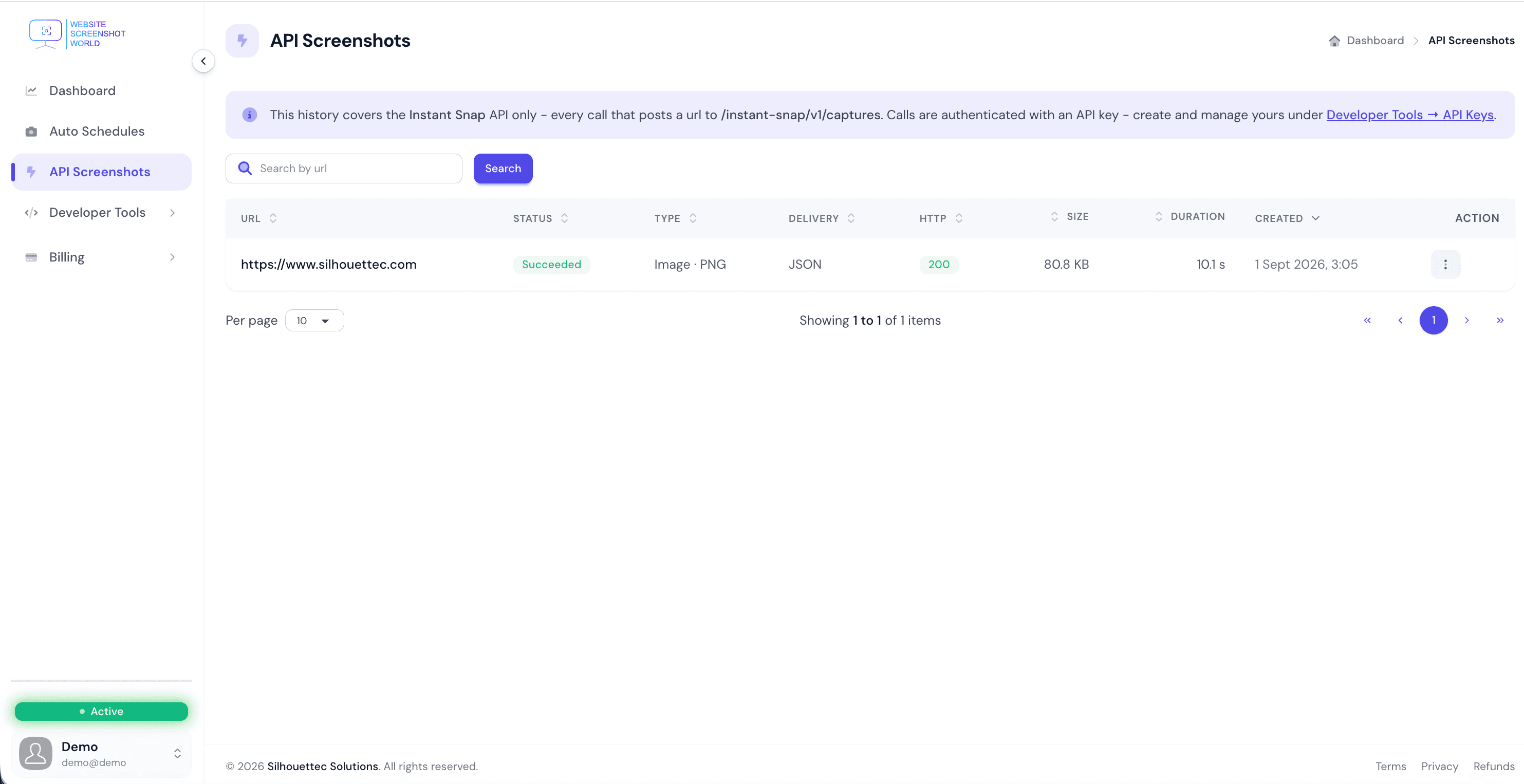
Every API capture is listed in the console with its status, type, delivery mode, HTTP code, size and duration.
The same rendering
API captures run through the pipeline as scheduled captures, so an automated run and an API call of the same page agree.
Visibility
Every call, accounted for
API captures are not a black box. The console lists each call with its status, output type, delivery mode, HTTP code, payload size and how long the render took — which is usually the fastest way to find out why an integration is misbehaving.
FAQ
Developer questions
How do I authenticate against the screenshot API?
With an API key sent in the X-Api-Key header. Create and manage keys under Developer Tools → API Keys in your account; each API has its own tab and its own keys - an Instant Snap API key starts with wsw_api_, an Auto Schedule API key with wsw_autoapi_.
What is the smallest possible request?
Just a URL: {"url":"https://example.com"}. That returns a 1920×1080 desktop PNG with ad and pop-up blocking enabled, delivered as JSON with a link valid for 24 hours. Every other field has a published default.
Can I get the image back directly instead of a link?
Yes. Set response_type to by_format and the response body is the file itself, with the capture metadata in X-InstantSnap-* headers. Nothing is stored in that mode, so the capture cannot be fetched again afterwards.
Can the API give me a page's text instead of a picture?
Yes. Set media_category to content, or just send "format": "markdown", and the answer is the page's readable main content - the article, docs or product text without navigation, footers, ads, cookie banners or scripts. markdown keeps headings, lists, links and tables; text is the same content without markup. The page is loaded in a real browser like a screenshot, so pages built with JavaScript work. It counts as one capture against the same allowance as an image and is charged only when it succeeds.
Can the API deliver straight into my own S3-compatible bucket?
Yes. With response_type set to cloud_storage the capture is uploaded into the bucket named in the request, and the response carries an s3_delivery block describing the upload alongside the usual envelope.
How do I know what the defaults are?
GET /instant-snap/v1/defaults publishes every value that fills in for a field you do not send. It needs no API key, is safe to cache for a day, and is versioned through spec_version, so a client library and the server cannot drift apart.
What are the rate limits?
Each plan has an API rate limit: a number of requests it accepts per minute - a cap on how fast requests are accepted, not a promise of how many captures finish in a minute. That window is shared: quick captures started from the dashboard draw on the same allowance as API calls, and it is per subscription, so creating extra API keys does not buy extra throughput.
What happens when something goes wrong?
Every refusal, in all delivery modes, is the same JSON envelope: { "success": false, "error_code": …, "error_message": … } — never an empty or truncated body. Standard status codes are used, including 401 for a bad key, 402 when the allowance is spent and 429 when the per-minute window is full.
Is there a difference between the two APIs?
Yes. Instant Snap captures any URL on demand with the options supplied in the request. The Auto Schedule API triggers an immediate capture of a page you have already set up, reusing that page's stored profile and delivery settings.
Create a key and make your first call
Sign up, generate an API key under Developer Tools, and capture your first page with a one-field request.