

Billing
Plans, subscription and invoices
Everything under Billing: the plans, the free trial, changing or cancelling a subscription, extra storage, what happens past your included volume, and your invoices.
The plans
Four plans, each billed monthly in US dollars, before tax. One subscription covers the workspace — both Auto Schedules and the Instant Snap API draw on it.
| Value | Meaning |
|---|---|
Starter — $15 a month | 2,000 captures, 1 GB storage, 1 cloud destination, an API rate limit of 40 requests a minute. One person. No video. |
Pro — $59 a month | 10,000 captures, 10 GB storage, 2 cloud destinations, an API rate limit of 80 requests a minute, sitemap schedules of up to 1,000 pages a run. One person. No video. |
Business — $149 a month | 25,000 captures and 100 videos, 25 GB storage, 3 cloud destinations, an API rate limit of 150 requests a minute, sitemap runs of up to 1,000 pages. 3 people, up to 5 with extra seats. |
Business Plus — $349 a month | 50,000 captures and 1,000 videos, 50 GB storage, 3 cloud destinations, an API rate limit of 200 requests a minute, sitemap runs of up to 1,000 pages. 10 people, up to 50 with extra seats, and up to five custom roles. |
- A rate limit, not a speed. The requests a minute are how many requests the plan accepts in any one minute, from schedules and API calls together (see Capacity). They are not a number of captures finished per minute: how long a capture takes depends on the page.
- One shared allowance. Images, PDFs and page sources all count against the same number of captures. Videos have an allowance of their own.
- In every plan: both products, webhooks, headers and cookies, change detection and the MCP server.
- Workspace notification address — Business and Business Plus. See Notifications.
- Enterprise is a contact route rather than a checkout: custom capture limits and seat counts, trusted timestamps and priority support, quoted to your needs.
The free trial
Each organization can take one free trial. It starts from the Start free trial button on the dashboard or on BillingSubscription — no card needed — once your email address is confirmed.
| Value | Meaning |
|---|---|
Length | One month. |
Captures | 100 images, PDFs and page sources together. No video. |
Storage | 100 MB. |
Auto Schedules | Up to 4. |
Not included | Cloud destinations, webhooks, over-limit usage, headers and cookies, and choosing the country Instant Snap captures from. |
Buying a plan ends the trial when the plan starts: the trial’s remaining captures do not carry over, and the plan’s allowance starts in full. Captures from a trial are kept for at least 7 days after it ends.
Buying a plan
BillingPricing lets you choose a plan, then how much storage it comes with, then continue to checkout. The checkout is run by Paddle, our payment provider, which calculates tax from your billing address. Pricing is in the menu only while the workspace has no paid plan, and only for a role allowed to buy.
One subscription at a time
Managing your subscription
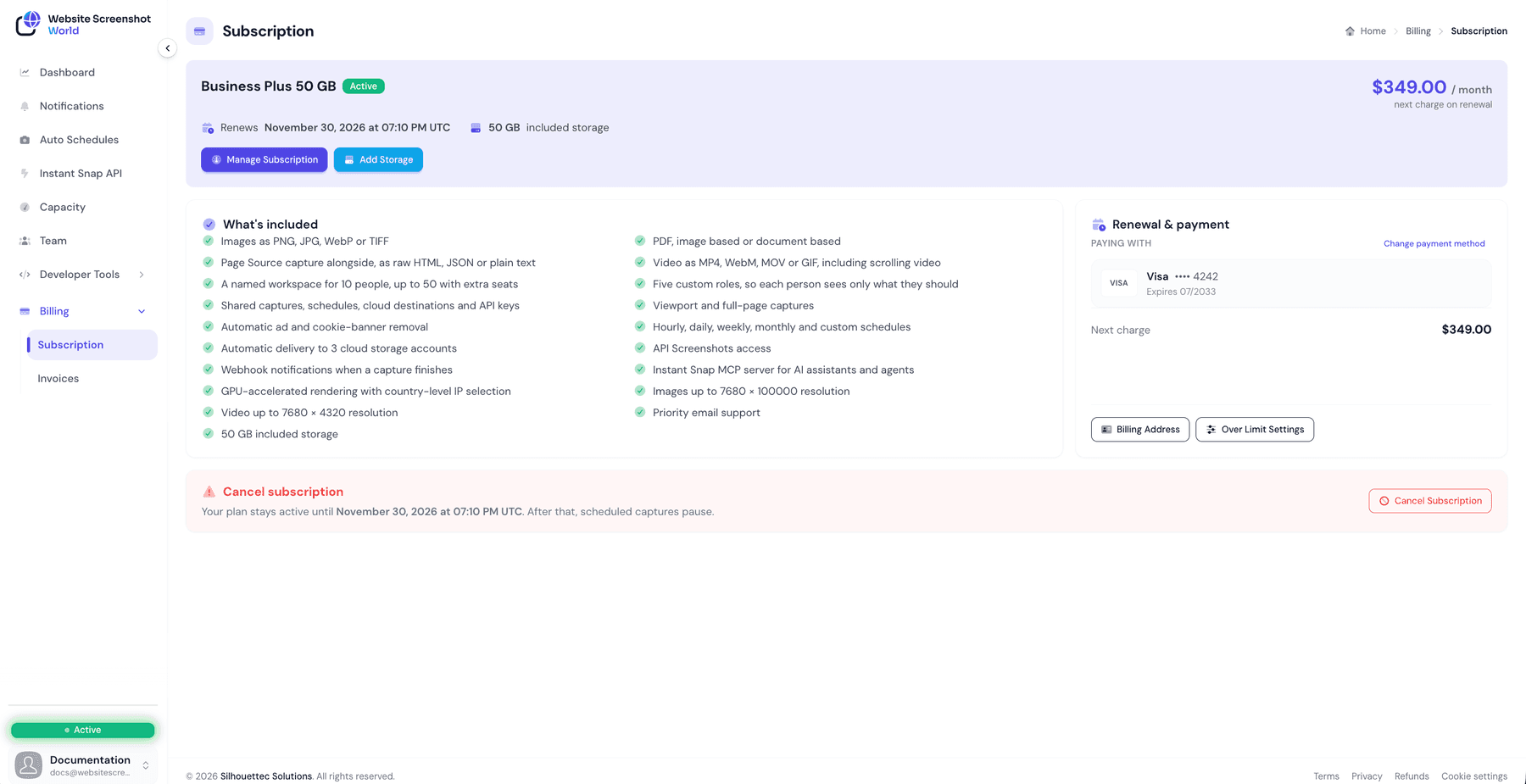
BillingSubscription shows your plan and its status, when it renews or ends, the next charge, your included storage, and the saved payment method.
Manage Subscription lists the four plans with your current one marked. Which way you move decides when the change happens:
| Value | Meaning |
|---|---|
Upgrade | Applies as soon as the payment provider confirms it, and your saved payment method is charged at once. You choose how: Keep my billing date (you pay the difference for the rest of this period) or Start a new period today (a full period from today, less the unused part of your current plan; your renewal date moves). Both prices are shown before you confirm with Yes, charge my card now. |
Reduction | Scheduled for your next renewal. Your current plan and price continue until then, and you can cancel the scheduled change before it happens. |
- A change to a smaller plan is refused while you store more than it includes, or have more people than it has seats. Delete captures, or remove members, first.
- Change payment method replaces the card or other method on file, through the payment provider’s own secure form.
- Cancel Subscription is at the foot of the page. Your plan stays active until the end date; after that, scheduled captures pause. There is no resume action — to come back, take out a new subscription.
Seats
Storage add-ons
Add Storage buys extra storage on top of what the plan includes, without changing plan: 25 GB for $3, 100 GB for $9 or 250 GB for $20 a month.
- Adding or moving to a bigger add-on is charged today, for a full month.
- Moving to a smaller add-on, or to No add-on, takes effect at your next renewal — and is refused while you store more than would fit. The panel tells you how much to delete first.
Check what is filling the storage first
Over-limit usage
By default, your included volume is the limit: once it is used, captures stop until the next period. Over Limit Settings — on the Subscription page, or Manage on the dashboard’s Over-limit bursting card — let you allow a set amount beyond it instead.
- Images and videos are configured separately, and each is off until you turn it on.
- The amount you allow is set in steps of 1,000, starting at 1,000, up to a ceiling your plan defines. The panel shows the price per capture and what your chosen amount could cost.
- Not available on the free trial.
- Not changeable once a subscription is cancelled; existing settings stay until the plan ends.
| Value | Meaning |
|---|---|
Starter | Up to 5,000 extra captures at $0.008 each. |
Pro | Up to 10,000 extra captures at $0.0065 each. |
Business | Up to 25,000 extra captures at $0.006 each, and 1,000 extra videos at $0.01 each. |
Business Plus | Up to 50,000 extra captures at $0.0055 each, and 2,000 extra videos at $0.0095 each. |
Charged after the period, in blocks of 1,000
Failed and refused captures
A capture that fails on the way — the page does not load in time, or something goes wrong on our side — produces nothing and is given back to your allowance.
A capture the website itself refuses — it answers “access denied” or “too many requests” to every attempt — is free up to 5% of your plan’s monthly captures in each billing period. Past that, refused captures count against your allowance like any other capture: each one still takes a browser and several attempts from different locations.
A schedule whose website refuses three runs in a row is paused, and you are told in Notifications. Try another capture location in the web profile, then resume it from the schedule’s page.
Invoices
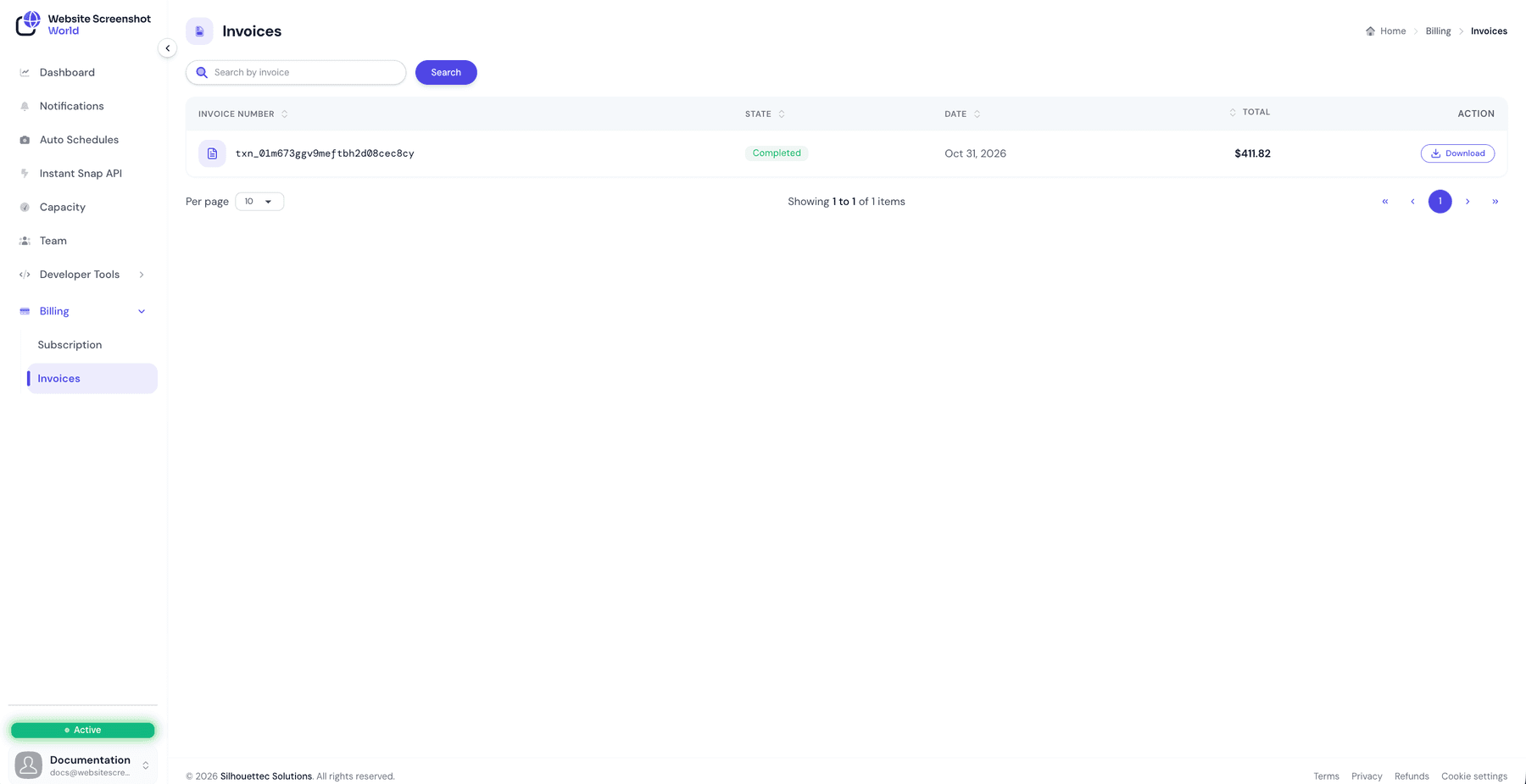
BillingInvoices lists every invoice with its number, state, date and amount, and can be searched and sorted.
| Value | Meaning |
|---|---|
Paid or Completed | A Download button fetches the invoice document. |
Billed or Past Due | The charge has not gone through yet. A Pay now button opens the secure checkout for it. |
Refunded, Partially refunded or Charged back | An approved refund or a chargeback is shown on the invoice it applies to. The receipt stays downloadable with the Download button. |
Download links are short-lived by design
Refunds follow our cancellation and refund policy.
Billing address
A billing address is needed before a subscription can start. Only three fields are mandatory — Email, Postal Code and Country — and they are what the checkout uses to calculate tax. Everything else is optional.
It can be filled in from the checkout itself, or from the Billing Address button on BillingSubscription.
Did this page answer your question?
Tell us what is missing