

Web Profiles
Web Profiles
A Web Profile is the capture recipe. It holds every decision about how a page is rendered and where the file goes, and any number of schedules can share it.
What a Web Profile is
Schedules say what and when. Profiles say how. Separating them means you configure a capture once — a mobile-sized full-page PNG, captured from Germany, ads blocked, delivered to Drive, kept until you delete it — and then point a hundred schedules at it.
Editing a profile changes every schedule that uses it, from their next run onwards. Where one page needs to differ, give it its own profile rather than editing the shared one.
What it contains
The form is grouped into six sections, in this order. Each topic has its own page in this guide with the full field reference. At the top, In plain words reads the whole profile back to you in one sentence and updates as you change things.
| Value | Meaning |
|---|---|
Basics | The profile's name, and the Location: which of up to 18 countries the capture runs from. |
Output | Image, video or PDF; the file format; and an optional copy of the page source alongside. |
Device & viewport | Desktop at a preset or custom size up to 7680 × 4320, or emulate one of around 200 phones and tablets. |
Capture behaviour | Viewport or full page, the full page height, page timeout, scrolling delay, scale factor and zoom, and the Block ads and Dismiss pop-ups switches. |
After the capture | How long captures are kept, where they are delivered, the capture email, the webhook switch and change detection. |
Fine-tuning | Folded blocks with sensible defaults: when captures may run (Trigger Window), geolocation, browser language, time zone and user agent, the timestamp watermark, and headers and cookies. |
Creating one
Go to Auto SchedulesConfigureWeb Profiles and press Add Web Profile. The form opens in a side panel. Three things are yours to fill in:
- Name — something you will recognise in a dropdown later.
- Format — PNG, JPG, WebP or TIFF for an image.
- Keep captures for — Keep until I delete them or Do not keep after delivery.
Everything else already has a working default:
- Desktop, 1920 × 1080, device scale factor 1.00
- Image, viewport capture
- Page timeout 30,000 ms, scrolling delay 2,000 ms
- Block ads and Dismiss pop-ups on
- Captured from the first location in the list, the United States
- Delivered nowhere, no watermark, no emails, change detection off
Save stores it; Save & add another stores it and gives you a fresh form; Discard closes the panel without saving. A profile can also be cloned from its row menu, which copies every setting, headers and cookies included.
Name profiles for what they do
Zero-day retention needs a destination
How many profiles should I have?
Fewer than you think. A profile per rendering situation, not per page. Most accounts settle on a handful:
- Desktop full page, for archiving and compliance evidence.
- Mobile emulation, for checking what phone visitors see.
- One per country, when you are monitoring geo-targeted content.
- One with headers or cookies, for pages behind a login.
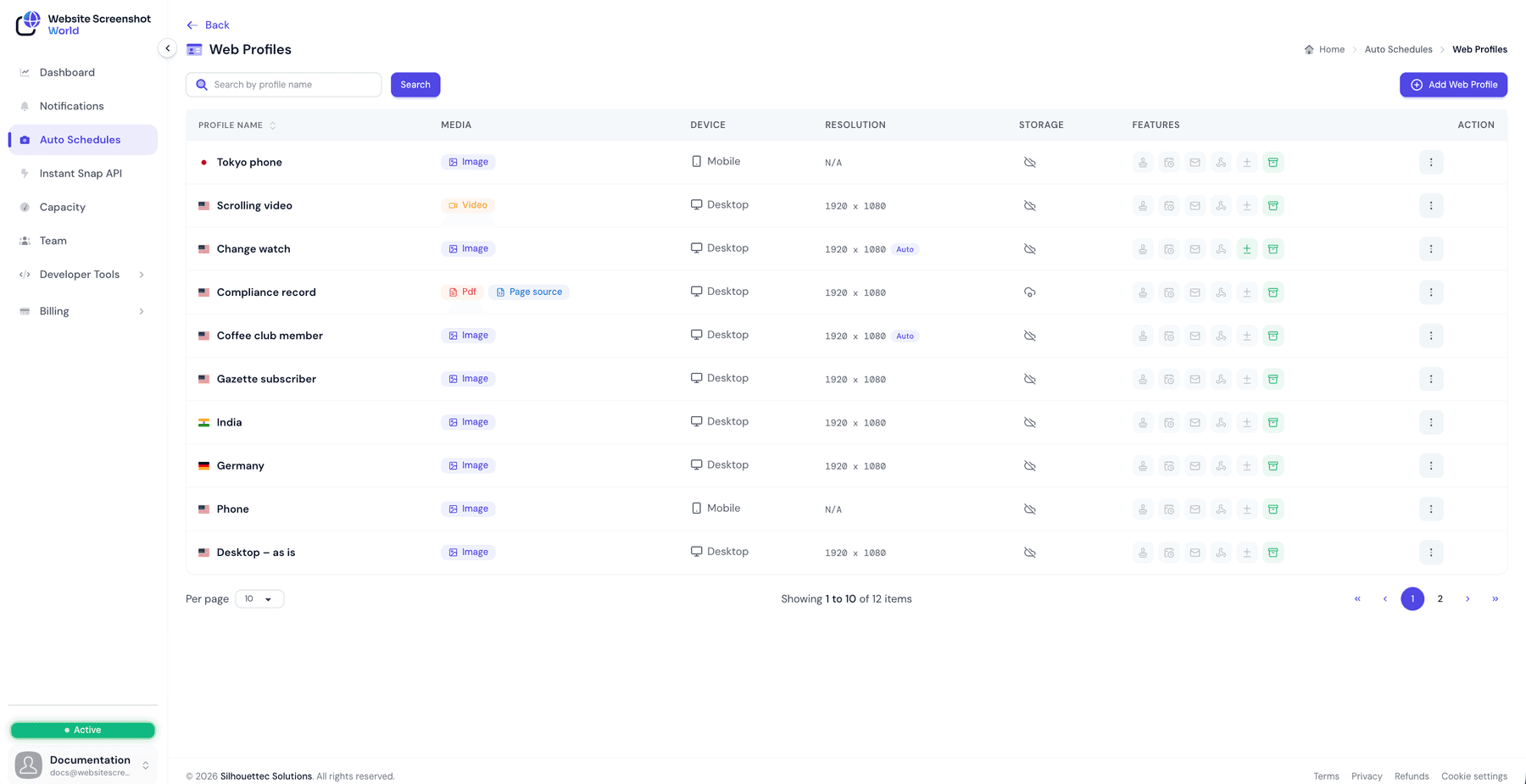
The profile list
The list shows each profile’s name, media type, device, resolution and storage, plus a row of feature chips telling you at a glance whether a watermark, a trigger window, email notifications, the webhook switch, change detection or retention are switched on. The flag beside each name is the country that profile captures from, and mobile profiles read N/A under resolution because the emulated device decides the viewport.
Did this page answer your question?
Tell us what is missing