

Organization
Capacity
A plan comes with a rate limit: the number of requests it accepts in a minute. Capacity is how that limit is divided between your schedules and your API traffic.
What capacity is
Every plan carries a rate limit that both products draw on: scheduled captures as they fall due, and Instant Snap API calls as your code makes them. It limits how many requests are accepted in a minute; it is not a promise of how many captures finish in one - that depends on the pages. Capacity, on Capacity and mirrored by a card on the dashboard, is the one setting that governs how that allowance is shared. It is not billing — nothing here changes what you pay.
| Value | Meaning |
|---|---|
Starter | 40 requests a minute accepted. |
Pro | 80 requests a minute accepted. |
Business | 150 requests a minute accepted. |
Business Plus | 200 requests a minute accepted. |
Free trial | 10 requests a minute accepted. |
Reserving capacity
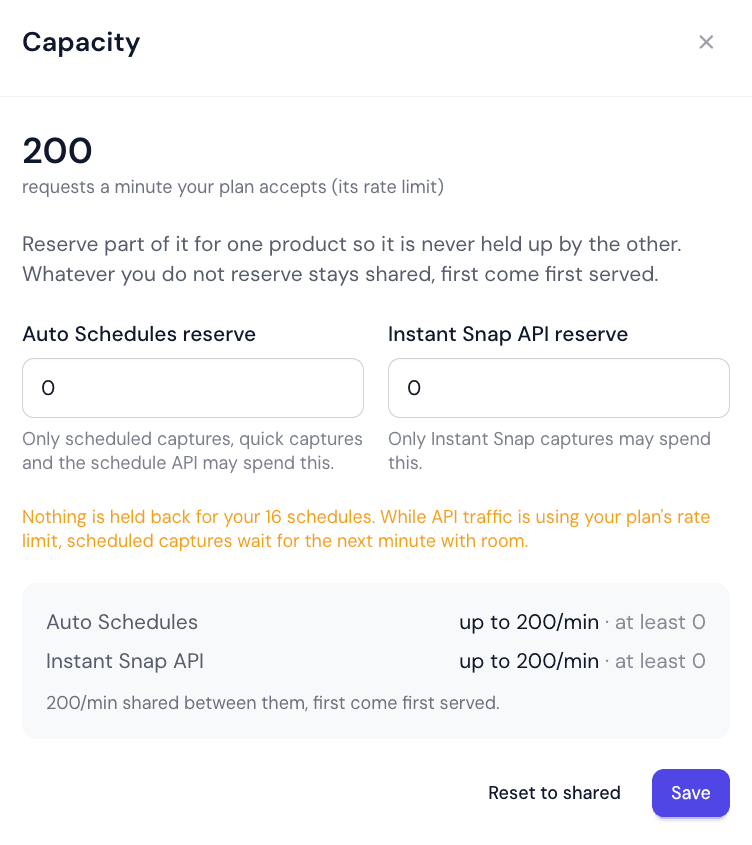
Choose Reserve capacity (or Change reserves once you have) to hold part of the minute back for each product. Changing it needs a role with billing and capacity rights.
| Value | Meaning |
|---|---|
Auto Schedules reserve | Requests a minute always accepted for schedules, whatever the API is doing. |
Instant Snap API reserve | Requests a minute always accepted for your code, whatever the schedules are doing. |
The two reserves cannot add up to more than the plan's allowance. What is left after both is still shared, so a product's ceiling is the allowance minus the other product's reserve.
Plan against the reserve, not the ceiling
Reading the figures
Each product reads up to a number of requests a minute — the most it can ever have accepted — and at least its reserve, the part it is guaranteed. The same two figures appear on the dashboard card. While a plan is ending they are shown but cannot be changed.
Did this page answer your question?
Tell us what is missing