

Storage and delivery
S3-compatible storage
The destination for storage you control. Configured with keys rather than a sign-in, which makes it the one to get exactly right — and the one that keeps working longest once you have.
What you can connect
Anything that implements the S3 API. The provider is listed as S3-compatible bucket, and in practice that covers:
- Amazon S3
- Cloudflare R2
- Wasabi
- Backblaze B2, through its S3-compatible endpoint
- MinIO and other self-hosted object stores
- DigitalOcean Spaces, Linode Object Storage and similar
The configuration
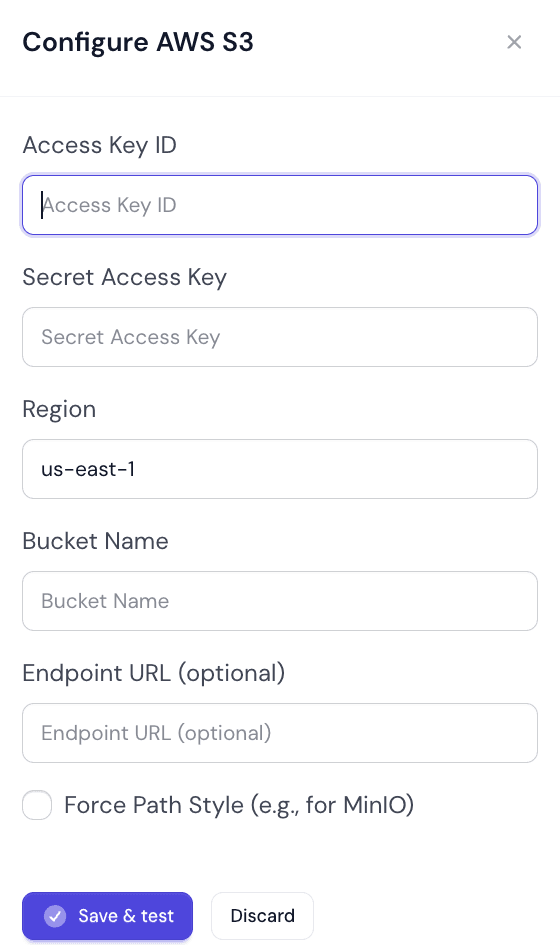
From Auto SchedulesConfigureCloud Storage, press Add destination, choose S3-compatible bucket and press Next: bucket details. The Configure AWS S3 panel opens. Save & test saves the settings and immediately checks the bucket with them.
| Field | Type | Default | Description |
|---|---|---|---|
Access Key IDRequired | Text | — | The public half of the key pair. |
Secret Access KeyRequired | Text | — | The private half. It is never shown back to you: when you come back to edit, the field is empty and marked Saved - leave blank to keep it. |
RegionRequired | Text | us-east-1 | Pre-filled with us-east-1. Providers that have no regions usually accept any value. |
Bucket NameRequired | Text | — | The bucket captures are written into. |
Endpoint URL (optional) | URL | — | Optional. Leave empty for Amazon S3. Required for everything else — it is what points at R2, Wasabi, MinIO and the rest. |
Force Path Style (e.g., for MinIO) | Checkbox | Off | See below. Needed by MinIO and several others. |
The secret is never shown again
Force Path Style
There are two ways to address a bucket, and providers disagree about which they accept.
| Value | Meaning |
|---|---|
Off — virtual-hosted | The bucket is part of the hostname: bucket.s3.amazonaws.com. What Amazon S3 and most hosted providers expect. |
On — path style | The bucket is part of the path: endpoint/bucket. What MinIO and most self-hosted stores expect. |
If it will not connect, this is the first thing to flip
Credentials worth using
- Make a dedicated key. Not your root credentials, and not a key shared with anything else — a key you can revoke without breaking something else.
- Scope it to one bucket. Uploads only write objects. The connection test also needs to see the bucket and to write and delete a small test file. Nothing needs to read your captures or any other bucket.
- Use a bucket for this and nothing else. It keeps the permissions simple and the lifecycle rules obvious.
- Set a lifecycle rule on the bucket. Captures accumulate. Expiring or cold-tiering old ones at the storage side is cheaper than doing it here.
The bucket is your responsibility once the file lands
When it will not connect
| Value | Meaning |
|---|---|
Access denied | The key lacks permission to write to that bucket, or the policy names a different bucket. |
No such bucket | The name is wrong, or the bucket is in a different region from the one you gave. |
Endpoint or DNS errors | The endpoint URL is wrong or missing. Everything except Amazon S3 needs one, with its scheme. |
Connects, but nothing arrives | The destination is connected but not used: check it is not paused, and that a Web Profile delivers to My defaults with it in a default slot, or chooses it explicitly. |
When the test fails, the panel stays open with the reason beside the fields — for example The bucket could not be reached with these settings. — and the Connection column says Needs reconnect or Unreachable until it succeeds.
Did this page answer your question?
Tell us what is missing